

Programming Keys with a Bypass Cable for Select Chrysler, Dodge, Jeep, Ram Vehicles
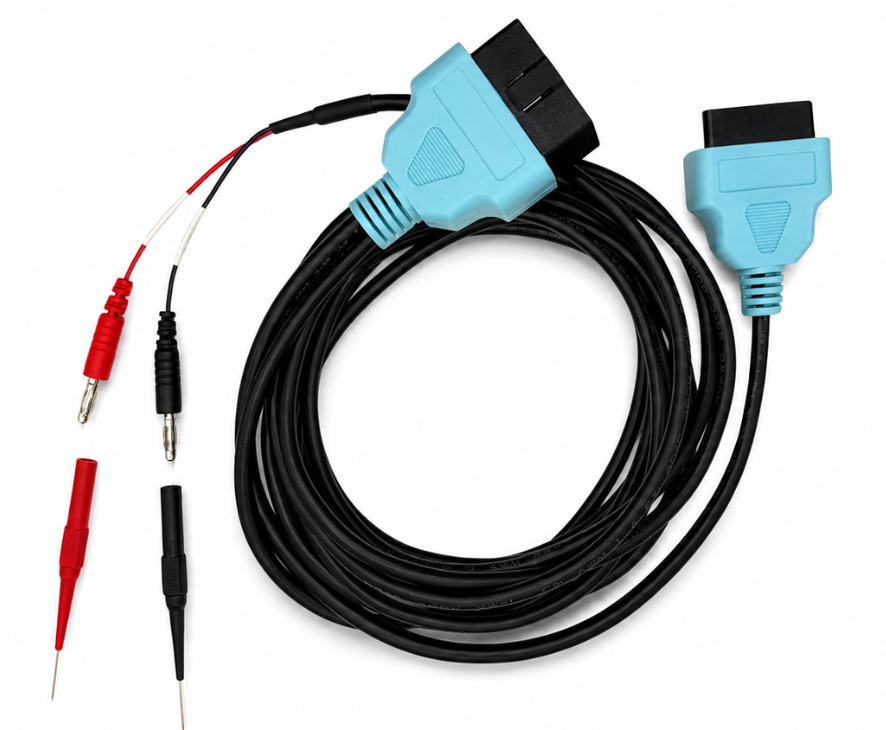
Car dealerships often charge $500-$600 or more to make a spare key or fob for many newer Chrysler, Dodge, Jeep, and Ram vehicles. Beginning in 2018, these vehicles include a Security Gateway Module that blocks anyone but the dealer from programming keys. Tom's Key Company offers the world's first consumer-friendly, do-it-yourself solution so you can skip the dealership and program your own spare key at home. Most people save $200-$400 with this easy 10-minute DIY project.
Please select your vehicle below.
- Pacifica 2018-2026
- Voyager 2020-2026
- Chrysler 300 (coming soon)
- Durango 2018-2026
- Journey 2018-2020
- Dodge Ram 2018
- Challenger (coming soon)
- Charger (coming soon)
- Gladiator 2020-2025
- Wrangler 2018-2025
- Grand Cherokee 2018-2021
- Compass (coming soon)
- Cherokee (coming soon)
- Renegade (coming soon)
Turn Key Start
- RAM 1500 2018
- RAM 2500 2018
- RAM 3500 2018
- RAM Trucks 2018
- RAM Ram Classic 2019-2024
- RAM 2500-5500 (coming soon)
Push Button Start
- RAM 1500 2019-2024
- RAM 2500-5500 2019-2024 (coming soon)

This Cable Lets You Make Car Keys Without the Dealership
Key Programming Instructions Video
Compatible vehicle
Chrysler Pacifica 2018-2026 Push Button Start
Chrysler Voyager 2020-2026 Push Button Start
Instructions:
1. Open the PMK app, connect via Bluetooth, scan your VIN or select vehicle info and select Smart Key (push-button start).
2. Connect the bypass cable. Pop off the plastic panel on the lower passenger side seat base. Find the buried wiring harness inside. Plug the Red pin into the left slot (White/Green wire) and the Black pin into the middle slot (Blue/White wire).
3. Plug the other end of the bypass cable and the PMK dongle into the OBD2 port using the adapter cable.
4. Follow the on-screen instructions on the app. Make sure the ignition is OFF and turn the hazard lights ON. Keep your cell phone at least 2 feet away from the new key fob so it doesn't interfere with the signal.
5. When prompted, hold the Unlock button on your new fob until its red light flashes twice, release, and then hold it again for 3 seconds. The new fob is now programmed.
6. Turn off the hazard lights, unplug the programmer and bypass cable, and test both keys to ensure they lock/unlock the doors and start the engine.

DIY Dodge Durango Key Programming (2018–2026)
Key Programming Instructions Video
Compatible vehicle
Dodge Durango 2018-2026 Push Button
Instructions:
1. Go to the passenger-side footwell, pull back the carpet on the left side, and pop off the small plastic trim panel to find the hidden wiring harness, then connect the bypass cable.
2. Plug the other end of the bypass cable and the PMK dongle into the OBD2 port using the adapter cable.
3. Open the PMK app, connect via Bluetooth, scan your VIN or select vehicle info and select Smart Key (push-button start).
4. Follow the on-screen instructions on the app. Leave the ignition OFF and turn the hazard lights ON.
5. Keep your phone at least 2 feet away from the new key. Take your original working key completely out of the vehicle (at least 10 feet away).
6. When prompted, press and hold the Unlock button on your new remote for 1 second. You'll hear the door locks cycle. The new key is now programmed.
7. Turn off the hazard lights, unplug the programmer and bypass cable, and test both keys to ensure they lock/unlock the doors and start the engine.

Easy Jeep Grand Cherokee Key Fob Programming at Home (2018–2021)
Key Programming Instructions Video
Compatible vehicle
Jeep Grand Cherokee 2018-2021 Push Button
Dodge Journey 2018-2020 Push Button
Instructions:
1. Go to the passenger-side footwell, pull back the carpet on the left side, and pop off the small plastic trim panel to find the hidden wiring harness, then connect the bypass cable.
2. Plug the other end of the bypass cable and the PMK dongle into the OBD2 port using the adapter cable.
3. Open the PMK app, connect via Bluetooth, scan your VIN or select vehicle info and select Smart Key (push-button start).
4. Follow the on-screen instructions on the app. Leave the ignition OFF and turn the hazard lights ON.
5. Keep your phone at least 2 feet away from the new key. Take your original working key completely out of the vehicle (at least 10 feet away).
6. When prompted, press and hold the Unlock button on your new remote for 1 second. You'll hear the door locks cycle. The new key is now programmed.
7. Turn off the hazard lights, unplug the programmer and bypass cable, and test both keys to ensure they lock/unlock the doors and start the engine.

Program Your Jeep Wrangler at Home (Easy)
Key Programming Instructions Video
Compatible vehicle
Jeep Gladiator 2020-2025 Push Button Start
Jeep Wrangler 2018-2025 Push Button Start
Instructions:
1. Connect the bypass cable. Drop the glove box down by popping off the left-side dampening arm. Identify the correct wiring block, look at the back right corner, then connect the bypass cable.
2. Plug the other end of the bypass cable and the PMK dongle into the OBD2 port using the adapter cable.
3. Open the Pair My Key app, connect via Bluetooth, and select the vehicle info. Then, choose Smart Key (push-button start).
4. Follow the on-screen instructions on the app. Leave the ignition OFF and turn the hazard lights ON.
5. When prompted, take your new key fob and use the top end of it to physically press and hold down the vehicle’s Start/Stop button for 5 seconds. The app will flash "Success". Key is now programmed.
6. Turn off the hazard lights, unplug the programmer and bypass cable, and test both keys to ensure they lock/unlock the doors and start the engine.

How to Program Dodge Ram Key Fob in 10 Minutes (NO Dealership!)
Key Programming Instructions Video
Compatible vehicle
RAM 1500 2018
Instructions:
1. Plug the programmer into the OBD port.
2. Connect the bypass cable. Locate the wiring block directly behind the OBD port and insert the Black pin into the center slot (Yellow wire) and the Red pin into the right slot (Green wire).
3. Open the Pair My Key app, connect via Bluetooth, and select your vehicle info.
4. Follow the on-screen instructions and wait for the app to finish initializing and gathering data.
5. Insert the new key into the ignition but leave it OFF. Turn the hazard lights ON and press continue in the app to let it finish the configuration. The new key is programmed.
6. Turn off the hazard lights, test that both keys start the engine and lock/unlock the doors, then unplug the programmer and the bypass cable.

Make a Spare Key Fob for Your Dodge Ram
Key Programming Instructions Video
Compatible vehicle
RAM 2500 2018
RAM 3500 2018
RAM Trucks 2018
RAM Ram Classic 2019-2024
Dodge Ram 2018
Instructions:
1. Plug the programmer into the OBD port.
2. Connect the bypass cable. Locate the wiring block directly behind the OBD port and insert the Black pin into the center slot (Yellow wire) and the Red pin into the right slot (Green wire).
3. Open the Pair My Key app, connect via Bluetooth, and select your vehicle info.
4. Follow the on-screen instructions and wait for the app to finish initializing and gathering data.
5. Insert the new key into the ignition but leave it OFF. Turn the hazard lights ON and press continue in the app to let it finish the configuration. The new key is programmed.
6. Turn off the hazard lights, test that both keys start the engine and lock/unlock the doors, then unplug the programmer and the bypass cable.
FAQ
Why do I need a bypass cable?
Some vehicles have security gateways that block certain programming functions through the OBD-II port. A bypass cable provides an alternate connection path that allows supported tools to communicate with the vehicle computer.
Where do I connect the bypass cable?
The connection point varies by vehicle. The app and demonstration videos show the location. If having trouble, let us know your vehicle's year, make and model and we'll show the exact location where to plug the bypass cable.
Do I need to return the bypass cable?
Yes. The bypass cable is a rental item must be returned together with the PMK programmer in order to receive your security deposit refund.
How much does a replacement key cost?
Most customers get a replacement key with the programming tool and bypass cable for $150 to $225 USD, depending on the vehicle and key type.
What should I do if programming fails?
Call technical support (M-F regular business hours). Phone number is in the app. Be at your vehicle and ready to program. If you need to chat or email us, include the:
- VIN
- Photos of the cable connection
- Photos of the key being used
- Screenshots or photos of any error messages
How hard is it?
It's easy. If you can drive a car, use an app, and follow directions, you'll be just fine. No engineering degree required.
What if I lost all my keys?
No problem! We have partnered with local companies that can make a new key if all keys are lost. Find them here. Come back to use for a spare key to save money before losing your only working key
What's Key By Photo?
Key By Photo is a service that lets you take photos of your key and upload them through our portal. Once submitted, we'll cut your new key before our quick shipping. Easy as point, click, done.
The buttons are broken on my existing key. Will this still make a new key with working buttons?
Yes! As long as your existing key still starts the vehicle, the new key will have fully working remote buttons after programming. Your thumbs will thank you.
Can I use any key with the programmer?
No. The key must be compatible with your vehicle, because not all keys speak the same language.
Do I need to keep all my existing keys with me?
If you have working keys, it's a good idea to have them available during programming. Some vehicles like to meet the whole key family.
Do I need an internet connection?
Yes. Your phone needs a cellular or wifi connection to use the app and complete programming. No signal, no magic.